Project Overview
Timetracker is an open source workforce management application built with React and Node.js for tracking hourly workers’ time, assigning tasks, and monitoring job locations in real-time. I created this project to address a common need for small businesses—a simple, effective way to manage hourly employees, assign work, and track time without expensive proprietary software.
The primary goal was to learn React and deepen my Node.js skills by building a real-world application with practical business value. While I initially had a live demo deployed, dependency updates eventually broke the deployment, so I’ve documented the functionality through demo videos and the codebase remains available on GitHub.
Key Features
Real-time Time Tracking - Employees clock in and out from their dashboard, with times and locations instantly appearing on the admin’s map and timesheet table.
Task Management - Admins assign tasks with project details and location information. Employees receive assignments in real-time and can create personal tasks.
Location Mapping - Google Maps API integration shows employee locations on a map when they clock in, with address autocomplete for easy data entry.
Data Administration - Full CRUD operations for projects, locations, employees, and activities. Export timesheets as CSV for payroll processing.
Authentication & Security - User registration and login system with bcrypt password hashing and role-based access control.
Modular Dashboard Design - Viewport-based interface where users open and close panels as needed, creating their own custom dashboard layout.
Design Philosophy
My goal was minimalism and modularity. The interface uses a viewport system where each feature lives in its own closeable panel, accessible from the Dashboard menu. Users can open as many viewports as they need, arranging their workspace however makes sense for their workflow.
This modular approach makes it easy to add new features—each viewport operates independently, so new functionality like charts, reports, or business processes can be added without disrupting existing features. The design uses Bulma and Bootstrap frameworks for responsive, professional styling.
Admin Dashboard Features
Timesheet Tracker
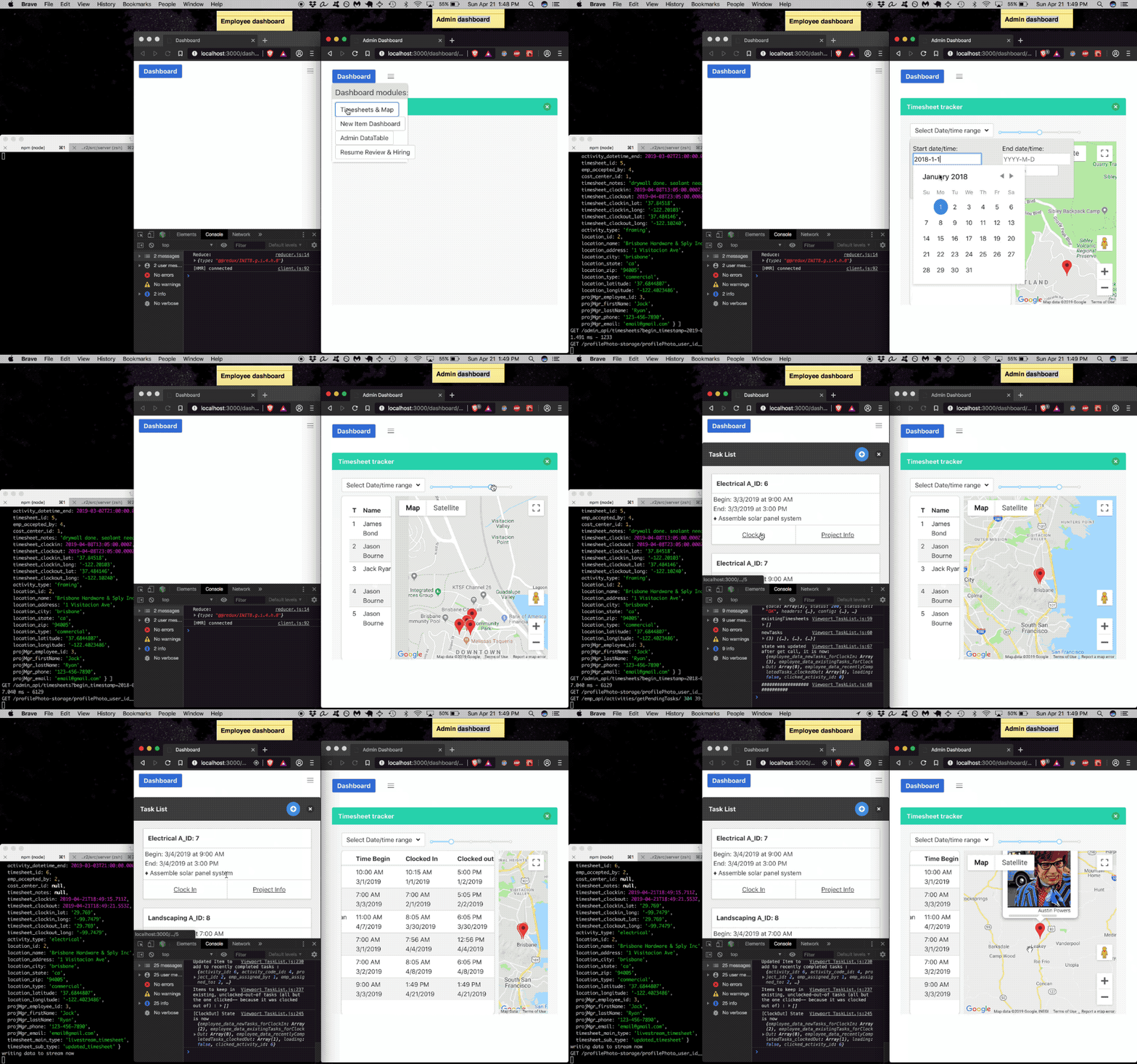
- Real-time display of clock-in/clock-out events
- Dual view: sortable data table and interactive map
- Time range search (defaults to past two weeks)
- Adjustable viewport width with UI slider
- Click table row to highlight location on map
Task Assignment
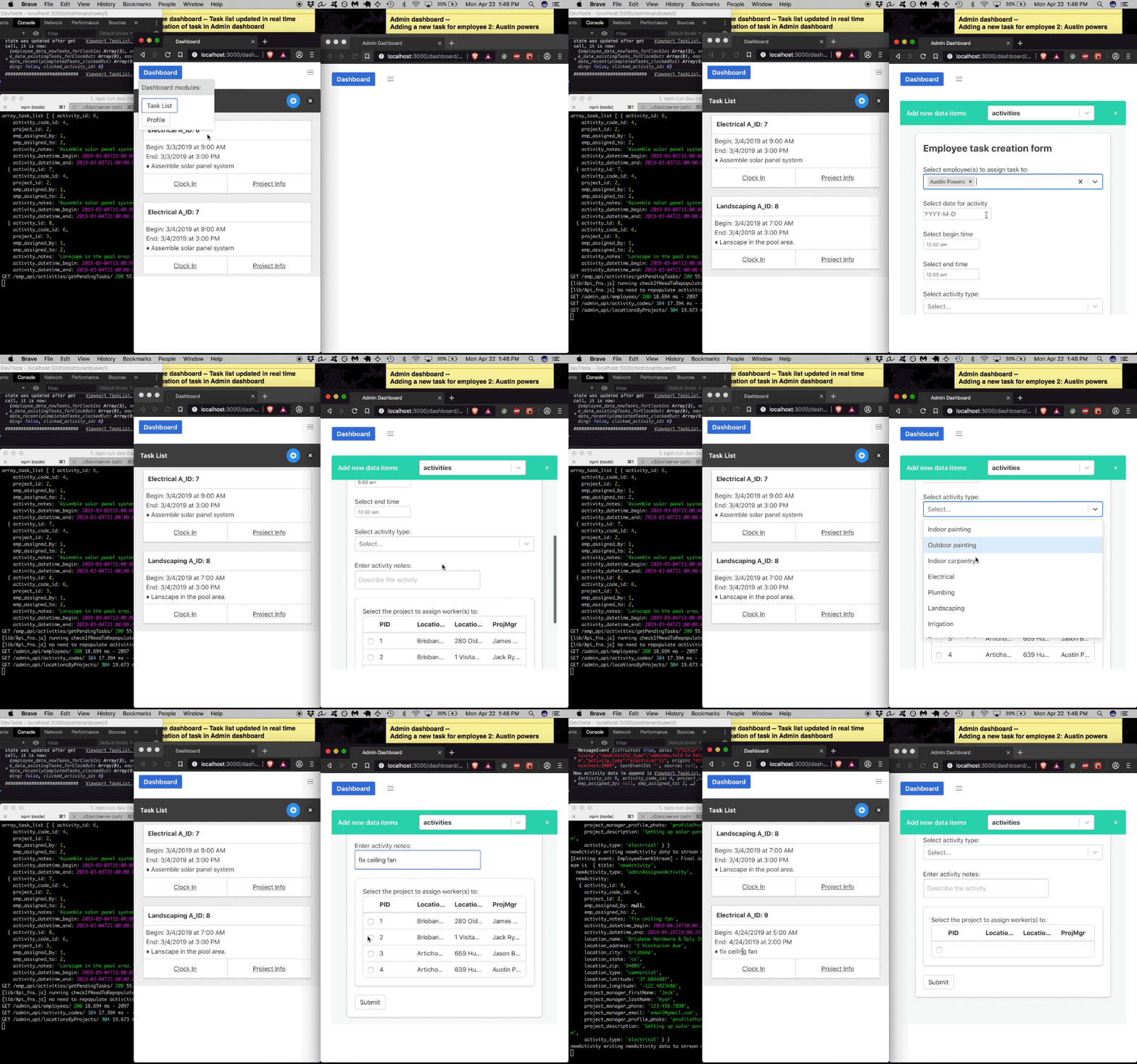
- Create tasks for any employee
- Auto-populated dropdowns for projects and locations
- Employees receive assignments instantly
- Forms adapt based on selected data type
Data Management

- Double-click any field to edit
- One-click row deletion
- CSV export for any table
- Manage projects, locations, employees, activities
Resume Review

- View applicant resumes in-browser
- Download documents for offline review
- Track applicant data and hiring pipeline
Employee Dashboard Features
Authentication

- Secure registration and login system
- Bcrypt password hashing with salt
- Role-based access control
- Password validation on login
Task Management
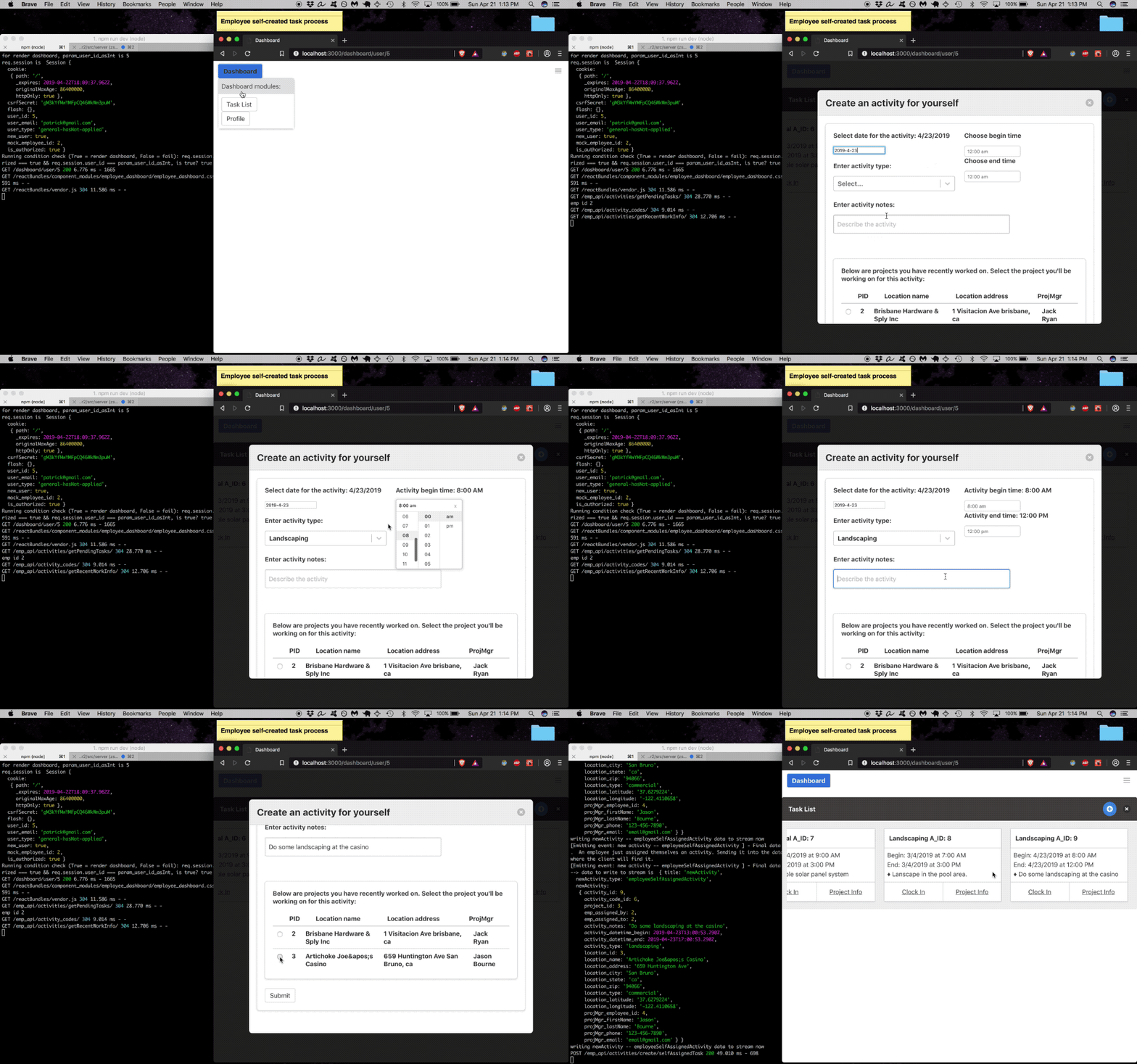
- Visual timeline of upcoming assignments
- Clock in/out with location tracking
- View project details and location maps
- Create personal tasks and reminders
Profile Management

- Google Maps autocomplete for addresses
- Photo upload with preview
- Resume/document upload with format validation
- Update personal information
Future Development: SaaS Transformation
I plan to evolve Timetracker into a multi-tenant SaaS platform. The roadmap includes:
Multi-tenant Architecture - Account isolation using table prefixing (e.g., account2_timesheets for account #2), keeping each business’s data completely separate.
White-label Branding - Account holders can upload logos, choose brand colors, and customize their instance with company-specific pages for employees to access.
Email Verification - Implement secure email verification for all user registrations using hash codes and database matching.
Manager Dashboard - A hybrid interface between admin and employee views, where project managers can assign work, communicate with teams, and generate customer quotes.
Subscription System - Monthly billing with tiered feature access.
Marketing Site - Professional landing page to showcase features and drive signups.
Once the SaaS foundation is in place, I can add specialized business modules for different industries—property management, field services, construction, retail, and more.
Expansion Ideas
The modular architecture makes Timetracker a platform for various business management needs:
Property Management - Track maintenance technicians, gardeners, and property managers. Add tenant portals for rent payment and maintenance scheduling.
Communication Tools - Internal news feed, project messaging system, team announcements.
Analytics & Reporting - Charts for work time logged, expense tracking, productivity metrics.
Advanced Features - Receipt scanning, warehouse monitoring, equipment tracking via IoT integration.
The core time tracking system provides a foundation for industry-specific solutions, all accessible through the same modular dashboard interface.
Technologies Used
Frontend:
- React - Component-based UI
- JavaScript (ES6+)
- Sass - CSS preprocessing
- Bulma & Bootstrap - UI frameworks
- Webpack - Module bundling
- Babel - JavaScript transpilation
Backend:
- Node.js - Runtime environment
- Express.js - Web framework
- PostgreSQL - Relational database
- bcrypt - Password hashing
DevOps & Tools:
- nginx - Reverse proxy and web server
- Linux (Ubuntu) - Server environment
- Git & GitHub - Version control
- VS Code - Development environment
- npm - Package management
APIs:
- Google Maps API - Location services and geocoding